
Code Agents
30 min · 3,663 words
- Explain why writing and running code makes an agent useful far outside coding
- Say what AGENTS.md is for and what does not belong in it
- Explain what MCP solves and why a tool written once now works everywhere
- Tell subagents, skills and slash commands apart by who invokes them and where they run
- Use hooks, plugins, auto memory, plan mode and effort for the job each one fits
Context Engineering ended with one point: the coding agents you already use are deep agents. They plan, they delegate work to subagents, and they read and write files. This module is about those agents themselves. We start with why they proved to be so much more useful than "a thing that writes code". Then we go through the eight ways you can extend one.
Why a Coding Agent Can Do More Than Code
Say you have a PNG file, and you want to compress it or convert it to JPEG. Without an agent, somebody has to write a tool for that job and give it to the model.
A coding agent needs no tool. It can install a Python imaging library and write the four lines of code that do the conversion. Ask it for a slide deck, and it does the same thing. It finds a pptx library and installs it. It writes the code. Then it gives you the file. Neither job was in its tool list.
Stop and think about this part for a moment. These agents do not only use what exists. They also build what does not exist. One story that people shared was about someone whose printer had no Linux driver. So they asked a coding agent to write one. The details may have changed as people retold the story, but the general idea is true: a model that can write and run code has a way to reach almost anything a computer can do.
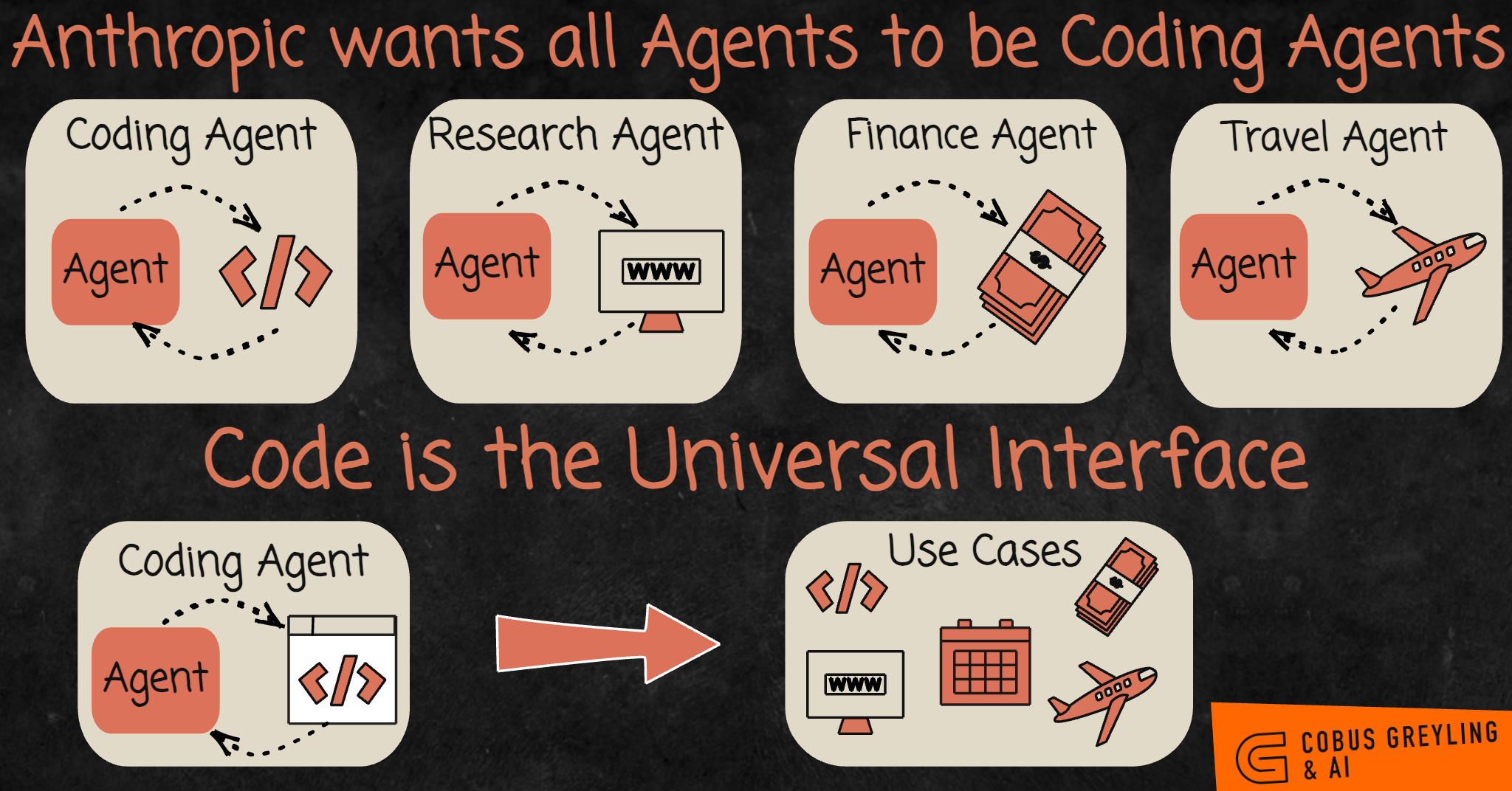
The top row is the old way: one agent for each domain, and each agent needs its own tools built for it. The bottom row shows why coding agents took their place. Code can reach the web, the calendar, the bank and the airline. So an agent that writes code covers all four, and nobody has to write four sets of tools.
So coding is not only one skill among many. It is the skill that can replace the others. That is why a coding agent helps with work that has nothing to do with software. Look back at the examples above: every one of them was a non-coding task.
The rest of this module is the standard equipment. Almost every modern coding agent has these features: Claude Code, Codex, Antigravity, Copilot and OpenCode. The names and file paths are a little different in each one. The concrete examples here come from Claude Code, and Claude Code features lists them together on one page.
AGENTS.md
README is for humans. AGENTS.md is for agents.
AGENTS.md is a plain markdown file in your repository. The coding agent adds it to its existing system prompt, after the system prompt that the vendor wrote. That is the whole mechanism. agents.md is the open format behind it, and it describes the file as "a dedicated, predictable place to provide the context and instructions to help AI coding agents work on your project".
What belongs in the file is the information that stays true across the whole repository and does not change much:
- build and test commands
- how the directories are laid out
- the conventions that your team follows
- the rules that an agent would otherwise get wrong twice
What does not belong is anything that becomes out of date in a week. A file full of details that no longer match the code is worse than no file. The agent believes what the file says.
You do not have to write it by hand. Run /init, and the agent reads your codebase and writes a first draft. Then you correct it.
There are two practical notes. First, Claude Code reads CLAUDE.md, not AGENTS.md. Your repository may already have an AGENTS.md for other tools. In that case, the documented solution is to write a CLAUDE.md that imports it with @AGENTS.md. Then you add anything specific to Claude below that line.
Second, both formats support nested files. You can keep one file at the root and another one inside frontend/ or backend/. The nested file loads only when the agent works in that directory. Keeping the frontend rules out of a backend task is context engineering, applied to your own instructions.
Slash Commands
A slash command is a prompt that you write once. You can run it again when you type /name. In Claude Code, slash commands live in .claude/commands/.
Here are three that are worth having:
/commitwrites the commit message in the way your team writes them./reviewruns your review checklist against the current diff./changelogturns merged pull requests into release notes.
Without them, you would type all three prompts again every week.
There is one thing to know here, because it changes the picture below: custom commands have been merged into skills. A file at .claude/commands/deploy.md gives you /deploy. A skill at .claude/skills/deploy/SKILL.md also gives you /deploy, and the two behave the same way. Your existing commands/ files keep working. The old difference between the two is now a frontmatter field, and we explain it in the skills section.
Model Context Protocol (MCP)
Here is the problem that MCP solves.
Say you write tools for your LangChain agent, so that it can work with your Jira. These tools wrap the Jira API: one creates an issue, one searches, and one adds a comment. Now you want the same thing in Claude Code, or in Codex, or in a smolagents script. Each of them expects tool definitions in its own shape. So you write the Jira tools again. And again.
The Model Context Protocol makes this one job instead of four. You describe tools in one standard way. Then any agent that speaks the protocol can use them.
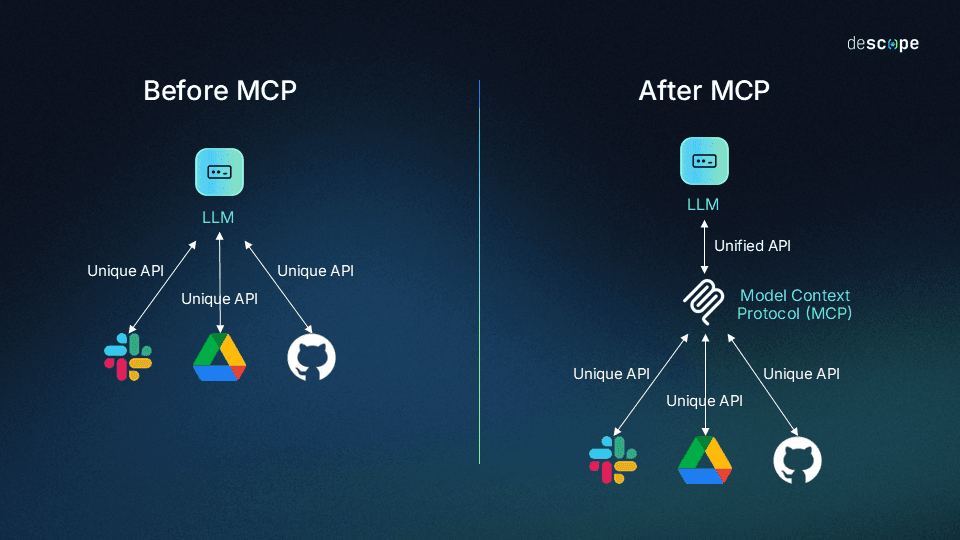
On the left, every service needs its own integration, written for the model that it talks to. So the work multiplies with the number of models. On the right, the API of each service has not changed at all. What changed is how the model reaches them: through one interface that the model already speaks. So you integrate each service once, not once for each agent.
What you get from it:
- No vendor lock-in. When you change agents, you do not have to rewrite your tools.
- Tool sets become portable. You write a tool once, and every agent that supports MCP can use it.
- Somebody else has already written the one you need. This is the part that surprises people.
That last point is what MCP is famous for. MCP splits the work between a client and a server. The tools live in an MCP server, and the agent is a client that connects to it. So an MCP server is a package of tools. To add one, you change configuration, not code. Point your agent at the Jira MCP server, and now it can work with your Jira.
In Claude Code, this is one command. Connect to MCP servers documents it:
# a hosted server, reached over HTTP
claude mcp add --transport http sentry https://mcp.sentry.dev/mcp

# a local one, run as a process on your machine
claude mcp add playwright -- npx -y @playwright/mcp@latest
Then claude mcp list tells you whether the server really connected. Add --scope project, and Claude Code writes the server into a .mcp.json file. Your teammates get this file when they clone the repository.
To see which servers already exist, look at awesome-mcp-servers, the community list.
NOTE
each connected server uses part of the context window. Its tool names and descriptions load into every session. Ten servers that you never call still cost you. Remove the ones you do not use, for the reasons given in Context Engineering.
Subagents
Context Engineering explained why subagents exist. A subagent gives expensive work a fresh context window. So the main window receives a conclusion instead of the whole investigation.
The extension point is that you can define your own subagents. Every agent comes with a general-purpose subagent. Beside it, you can add a security analyst, a frontend specialist and a test writer. Each one has its own system prompt and its own tool list. In Claude Code, they are markdown files in .claude/agents/.
A custom subagent is a fixed role. You write its instructions once. Every time the agent calls that subagent, the subagent starts from those instructions, in a clean window. If you prefer to start from someone else's subagents, awesome-claude-code-subagents is a collection of more than a hundred.
Skills
A skill is a folder of instructions. The agent can read it when a task needs it. Anthropic's Equipping agents for the real world with Agent Skills defines skills as "organized folders of instructions, scripts, and resources that agents can discover and load dynamically to perform better at specific tasks". In Claude Code, a skill lives at .claude/skills/<name>/SKILL.md.
The mechanism is the important part. It has a name that you should remember: progressive disclosure.
At startup, the agent loads only the name and the description of each installed skill. That is one or two lines for each skill, so twenty skills cost almost nothing. The agent reads the full instructions only when it decides that a skill applies to the task it is working on.
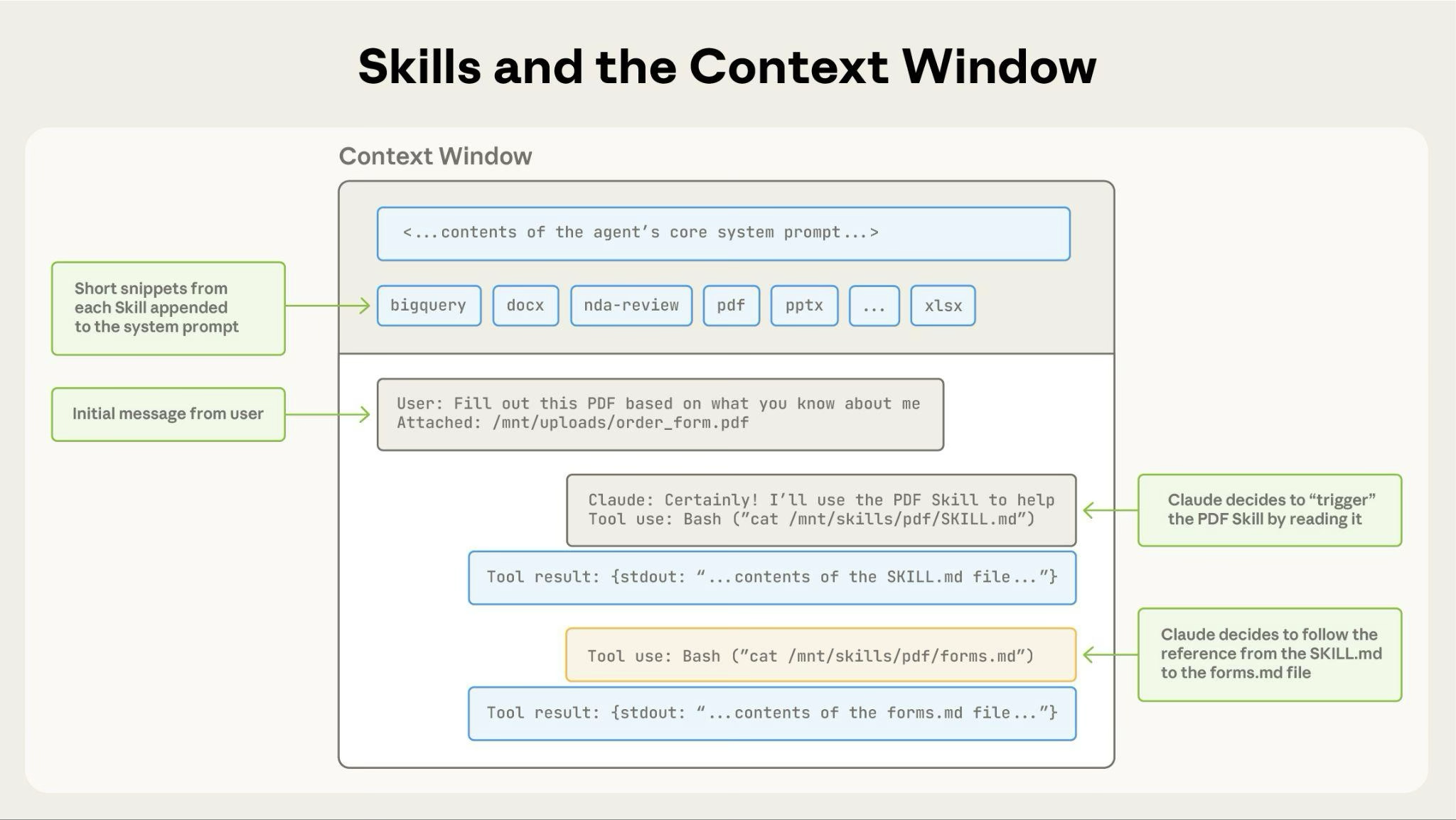
The grey band at the top is the full cost of all twenty skills while they are not in use: one short line each. When the PDF task arrives, the agent reads SKILL.md with an ordinary Bash call. Then it follows a reference inside that file to a second file. Notice that the skill enters the context as a tool result. So this is not a new mechanism. It is the tool loop from Tool Calling, used to read instructions instead of data.
So why do skills exist, instead of one very large system prompt? The reason is context engineering. Everything the agent might need is available. Only what it actually needs is in the window.
Skills against custom subagents. A subagent has fixed instructions, and it runs in an isolated window. It goes away and comes back with an answer. A skill changes the main agent instead. When this agent reads the security skill, it becomes a security reviewer for the rest of the task. It stays in the same window, and it keeps everything else it already knows. It is the same agent with a different mask on, and it can change masks again a minute later.
Skills against slash commands. This is the difference that survived the merge. It is about who may invoke the skill. By default, both you and the agent can invoke it. Two frontmatter fields limit this:
---
name: deploy
description: Deploy the application to production
disable-model-invocation: true
---
disable-model-invocation: true means that only you can run the skill. You want this for anything that has side effects. You do not want the agent to decide to deploy because the code looked ready to it. The opposite field is user-invocable: false. It means that only the agent can reach the skill. That field suits background knowledge: the kind of thing that would make no sense as a command that a person types.
For public collections of skills, anthropics/skills is the official one. awesome-claude is a broader curated list.
Hooks
Everything above is advice to a model. That means the model follows it most of the time. A hook is not advice. It is a shell command connected to a fixed point in the agent's lifecycle. It runs whether the model wants it to or not.
The hooks reference lists more than thirty events. These are the ones that people use in practice:
PreToolUse, before a tool call runs. You can block an edit to a file that nobody should touch, or refuse a command that would push to main.PostToolUse, after a tool call succeeds. You can run the formatter on every file that the agent just edited. Then the style never depends on whether the agent remembers.Stop, when the agent finishes its turn. You can run the test suite, and tell the agent to continue if a test is red.SessionStart, when a session begins. You can print the current branch and the open tickets into the context.
Remember the first one, because it carries the main point. An instruction in AGENTS.md that asks the agent never to touch a file is a request. A PreToolUse hook that blocks the write is a rule. This idea is where the next module begins, and it is the reason that module exists.
Plugins
A plugin is a package of the things above: commands, skills, subagents, hooks and MCP servers. They ship together, and you install them in one step. A new teammate does not have to copy six files into their .claude/ directory. You give them one plugin instead.
The layout is different for each vendor. For Claude Code, a plugin is a directory with a manifest. The manifest says which of those parts the plugin provides. Discover plugins explains how to install plugins, and the plugins reference explains how to build one. claude-plugins-official is the directory that Anthropic manages.
MEMORY.md
Every session starts with an empty context window. Two things carry knowledge from one session to the next, and they are not the same thing.
AGENTS.md is what you write. Auto memory is what the agent writes. The table below comes from How Claude remembers your project:
| CLAUDE.md files | Auto memory | |
|---|---|---|
| Who writes it | You | Claude |
| What it contains | Instructions and rules | Learnings and patterns |
| Scope | Project, user, or org | Per repository, shared across worktrees |
| Loaded into | Every session | Every session (first 200 lines or 25KB) |
| Use for | Coding standards, workflows, project architecture | Your preferences, corrections you give Claude, project context Claude cannot derive from the code |
The agent writes these notes from the corrections that you give it. So the thing you had to explain twice this week is still there next Monday. The files live in ~/.claude/projects/<project>/memory/. The agent loads a MEMORY.md index in every session. The detailed notes sit beside it, and the agent reads them only when it needs them. This is progressive disclosure again, this time applied to the agent's own notes.
One useful thing to do on purpose is to tell the agent to remember something. Say "remember that the API tests need a local Redis", and the agent writes it down. /memory shows you everything that the agent has saved. All of it is plain markdown that you can edit or delete.
Plan Mode
Say you have a large refactor, or several features to deliver at the same time. To start typing code is the wrong first step. Context Engineering gave the reason: an agent that has not written the plan down loses the map.
Plan mode is a read-only mode for this situation. The agent explores the codebase, and it cannot change a single line of it. So the whole first phase is about understanding what is really there. Then the agent writes a plan, and you read it. The agent starts to edit only after you approve the plan.
Claude Code's version goes one step further. Before it plans anything, it asks you clarifying questions. It can also offer you several approaches and let you choose one. That part is really useful, because the right time to catch a bad plan is before any code exists.
This also connects back to long-horizon work. An agent that works from a written plan you approved stays coherent for hours. The reason is that the plan sits on disk, and from there it keeps reciting the goal back into the context. If the same goal stayed in a context window instead, it would quietly rot away.
Reasoning Effort
In Prompt Engineering, chain of thought was about getting the model to reason before it answers. /effort is the dial that sets how much it reasons.
Here is a rough guide:
- medium for question answering, documentation, small fixes and simple edits.
- high for normal work. This covers most of what you do.
- xhigh for heavy coding: a real refactor, a subtle bug, a design decision.
- max when something is really hard and the lower settings have failed.
A higher setting is not free. It costs tokens and time on every turn. So if you turn it all the way up to fix a typo, you throw money away. If you want to see how much a higher setting really gives you, look at Artificial Analysis. It publishes benchmark results for each model at different reasoning settings. The numbers there show the gap between one setting and the next.
Notice What All of These are
Look back at the eight sections: AGENTS.md, slash commands, subagents, skills, hooks, plugins, memory and plans.
Almost every one of them is markdown in a folder. They are not a database. They are not a plugin API that you compile against. They are not a config format that somebody invented. They are files on disk, and you can:
- open them in any editor
- diff them
- review them in a pull request
- copy them to another machine
That is not laziness. It is the one format that both you and the model handle well. You can read and edit it without special tools. Models are unusually good at markdown and at moving around a filesystem, because a very large share of their training data is exactly that. So, in the end, the extension mechanism for a coding agent is the thing that it was already best at.
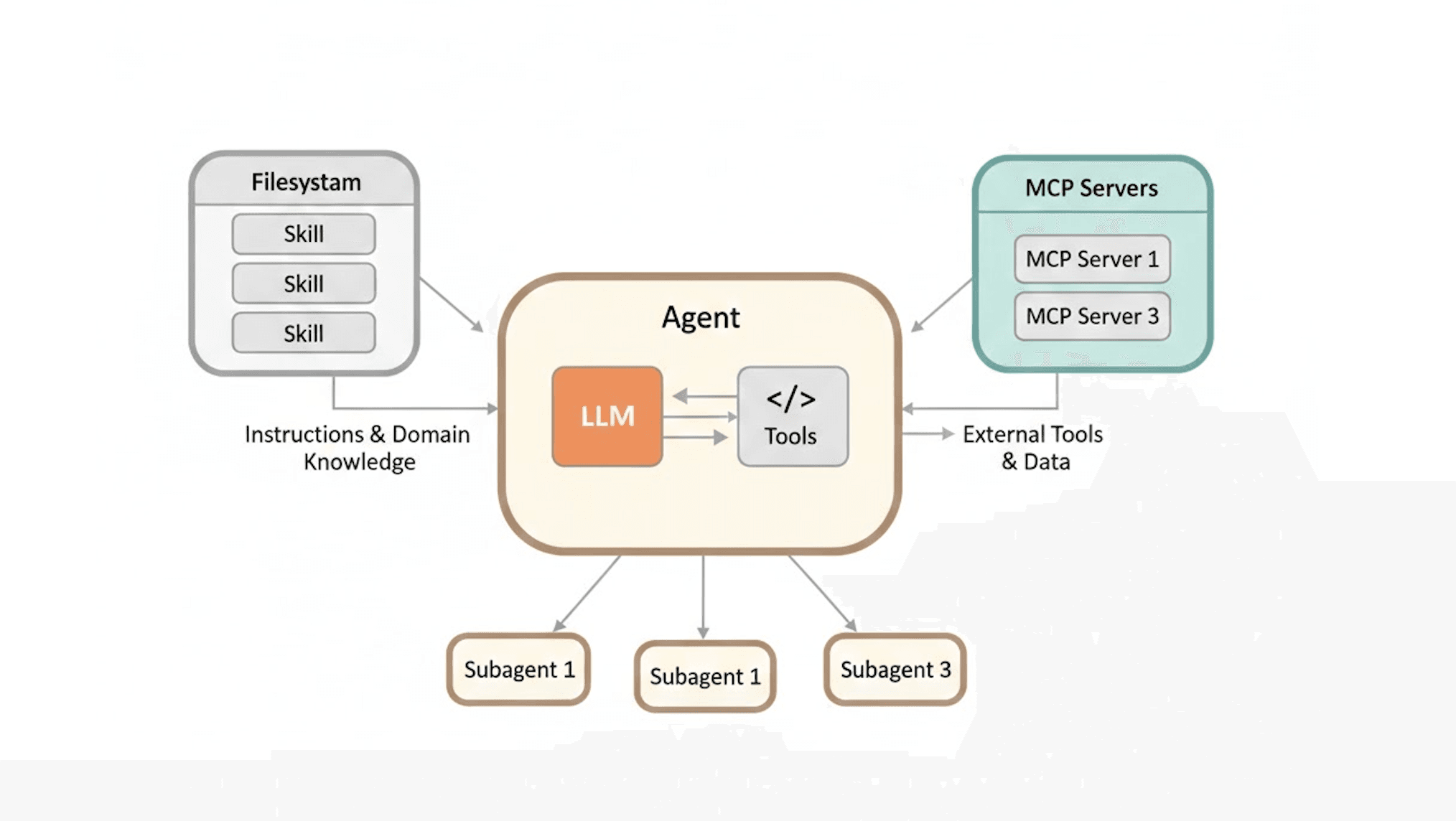
These are three different problems, so it helps to name which is which. The skills on the left are instructions that the agent reads to change how it behaves. The MCP servers on the right are tools that let it reach systems it could not reach otherwise. The subagents below are extra context windows. So each extension gives the agent one of three things: something to know (a skill), something it can do (an MCP server), or a separate place to think (a subagent).
Summary
A coding agent is much more powerful than its name suggests, because writing and running code is a way to reach almost anything. It does not need a tool for every job, because it can install a library or write one. That is why it helps with work that is not coding at all.
You can extend a coding agent in eight standard ways. Three of them are about what the agent knows. AGENTS.md gives it your repository's rules. Auto memory carries what it learned about you into the next session. And skills let it load instructions only when a task actually needs them. That last one is progressive disclosure, and it is the reason that you can afford twenty skills.
Three are about what it can do. Slash commands save a prompt that you would otherwise type again. MCP makes a whole tool set portable, so you write the tool once instead of once for each agent. And custom subagents give it fixed roles that it can hand work to, each in a clean context window.
The last two are about control. Hooks are the mechanical part: the things that happen whether the model chose them or not. Plan mode makes the agent understand the code before it may edit any of it. Plugins bundle any of the above into one install, and effort sets how hard the agent thinks while it does all of this.
Almost all of it is markdown in a folder. That is the format that you and the model both handle well.
Next: hooks were the first thing in this module that the model does not get a vote on. That idea is called harness engineering, and it is the subject of the next module.
References
📄 Articles
- Claude Code features: the whole extension surface on one page, useful as a checklist of what your own agent supports
- How Claude remembers your project: the CLAUDE.md and auto memory split, and where the files live
- Connect to MCP servers: how to add a server from start to finish, and what to check when it does not connect
- Equipping agents for the real world with Agent Skills: where progressive disclosure is explained properly
- Extend Claude with skills: the practical version, including the two fields that decide who may invoke a skill
- Hooks reference: every lifecycle event, and the input that each one receives
- Discover plugins and the plugins reference: first how to install a plugin, then how to build one
🛠️ Tools
- agents.md: the open format, including how nested files work in a monorepo
- Artificial Analysis: benchmark numbers for each model and each reasoning setting, if you want to see what effort gives you
🗃️ Repositories
- awesome-mcp-servers: the community list, to check whether your tool already exists
- anthropics/skills: the official skill collection
- awesome-claude: a broader curated list of Claude tooling
- awesome-claude-code-subagents: more than a hundred subagent definitions to start from
- claude-plugins-official: the managed plugin directory
Want a quick quiz?5 questions on the main points of this module
Why can a coding agent help with tasks that are not about software?