
Tool Calling
25 min · 1,790 words
- Explain how a model requests a tool call, and who actually executes it
- Describe what a tool schema contains, and where it comes from
- Explain why a tool's name and description decide whether it gets used
- Follow one real tool call through the request and the response
- Identify tasks that need a tool rather than more prompting
LLM Fundamentals, Training LLMs and RAG & Embeddings covered three things: what a model is, how it was trained, and how to put your own data in front of it. In all of that, the model is still only reading. In this module, the model starts doing things: it reads a file, runs a command, or calls an API.
This is the mechanism underneath every agent. So it is worth the effort to understand it exactly.
What is a Tool?
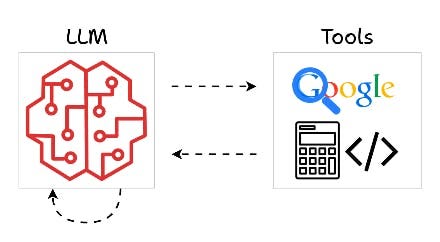
Tools are how a model reaches outside its own head. It searches the web, does maths or runs code, and then comes back with an answer.
A tool is a function that you write. It is an ordinary Python function with a name, some inputs and a return value. There is nothing special about it.
This is the part that people get wrong: the model never runs your function. It cannot. It has
no computer. The only thing it can do is write a message that says "I would like to call
read_file with filename="main.py"". Something on your side reads that message and runs the
function. Then it gives the return value back.
Tool Calls Grow Context
LLM Fundamentals introduced the context as a stack of messages. A tool call adds two new kinds of message to that stack. This picture shows the whole flow:
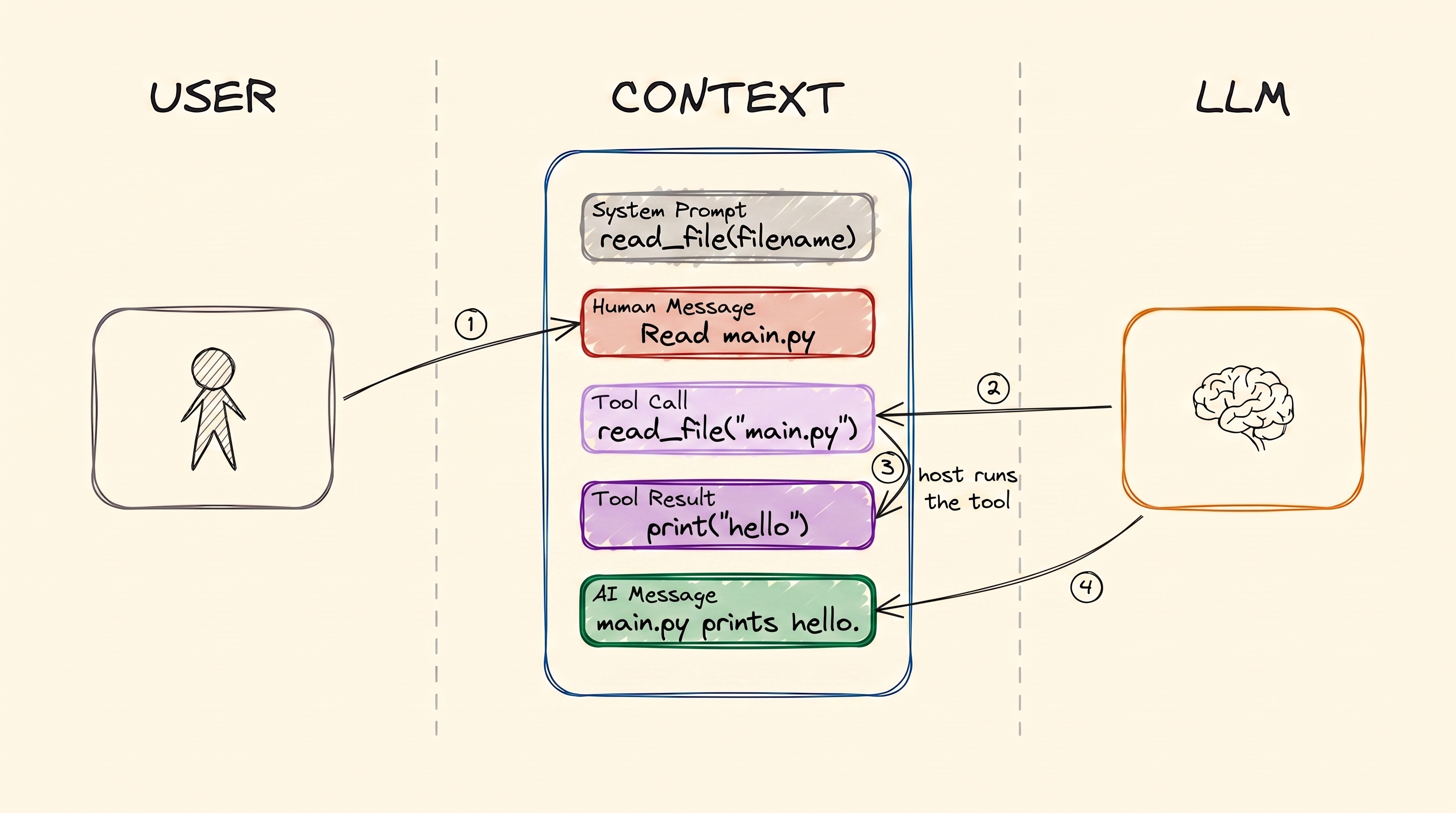
One tool call, in order. The system prompt declares the tool before anyone speaks. Then you ask, and the LLM writes a Tool Call. The host machine runs it and writes the Tool Result. Then the LLM reads that result and writes the answer.
Follow the four arrows, because it matters who writes each message:
- You write the Human Message.
- The LLM writes the Tool Call. It is asking, not doing.
- The host machine writes the Tool Result. Your laptop or your server is the machine that actually has Python installed and a filesystem to read.
- The LLM reads the whole context, which now includes that result. Then it writes the answer.
Both new messages stay in the context. That is why an agent's context grows so much faster than the context of a chat. One turn can add several messages instead of two.
Why Tools Exist
A model is trained on fixed data. So, on its own, it cannot know anything new, and it cannot change anything. Tools remove both limits.
It cannot search the web. So you write a function that takes a query, calls a search engine and returns the results. Now it can.
It cannot read your files. So you write a function that takes a filename and returns the contents. Now it can see your code.
Without tools, a model is a chatbot. With tools, it is an agent.
Tool Schema
Here is the part that surprises people.
Before the model can choose a tool, somebody has to tell it three things: that the tool exists, what it does, and what arguments it takes. That description is the tool schema. It is written in JSON.
You almost never write that JSON yourself. You write a normal function, and your framework generates the schema from it:
@tool
def get_weather(city: str) -> str:
    """Get the current temperature for a city."""
    return requests.get(f"https://api.example.com/weather?city={city}").text
From that one decorator, the framework reads:
- the name from the function name,
get_weather - the description from the docstring
- the parameters from the type hints, so
city: strbecomes a required string
Then the framework sends that schema with your request. The model receives it at the start, next to the system prompt. You register the function. The code that connects it to the model is not yours to write.
This means that the name and the description are not documentation. They are the interface.
They are the only information the model has when it decides which tool to use. Take a function
called get_data with the docstring "gets data". The model will pick it at the wrong moments and
skip it at the right ones. No amount of prompting fixes that. Give the tool a name that says what
it does. Write the docstring for the model, because the model is the one that has to choose.
Tool Call in Action
That is enough description. Here is a real exchange with a weather tool.
What the Model Receives
The instructions and the tool schema arrive together. In the API, they are separate fields. But from the model's point of view, they are one block at the top of the context:
SYSTEM
You are a helpful assistant with access to tools.
Answer the user's question. If you need information you do not have, call a
tool instead of guessing. Never invent a weather reading.

TOOLS
get_weather
  Get the current temperature for a city.
  city (string, required) - The city name, for example "Istanbul"
That readable block is the schema that the framework generated. In the request that goes to the API, it looks like this:
{
  "type": "function",
  "function": {
    "name": "get_weather",
    "description": "Get the current temperature for a city.",
    "parameters": {
      "type": "object",
      "properties": {
        "city": {
          "type": "string",
          "description": "The city name, for example \"Istanbul\""
        }
      },
      "required": ["city"]
    }
  }
}
Notice that both the description and the parameter description came from things that you wrote in Python.
What You Ask
USER
What's the weather in Istanbul right now?
What the Model Generates
It does not generate prose. It generates this:
{
  "role": "assistant",
  "content": null,
  "tool_calls": [
    {
      "id": "call_9k2m4Xq7",
      "type": "function",
      "function": {
        "name": "get_weather",
        "arguments": "{\"city\":\"Istanbul\"}"
      }
    }
  ]
}
Three things are worth noticing here. First, content is empty, because the model has not answered
yet. It has asked. Second, there is an id. This id is how the result gets matched back to this
specific call. Third, arguments is a string that contains JSON. It is not a JSON object.
Almost everyone gets this wrong once.
What the Host Machine Does
When this message arrives, the framework takes over. It parses the arguments and finds the Python
function registered under get_weather. Then it calls that function:
get_weather(city="Istanbul") # -> '{"city":"Istanbul","temp_c":34,"conditions":"clear"}'The return value goes back into the conversation as a new message. The framework tags this message
with the id from the call:
{
  "role": "tool",
  "tool_call_id": "call_9k2m4Xq7",
  "content": "{\"city\":\"Istanbul\",\"temp_c\":34,\"conditions\":\"clear\"}"
}
What the Model Answers
Now the whole context goes back to the model:
- the system prompt
- your question
- its own tool call
- the result
The model reads all of it and writes:
ASSISTANT
It's currently 34°C and clear in Istanbul.
That is the entire mechanism. Every agent that you will ever build runs these same steps in a loop, again and again.
The exact field names differ a little between providers. But the shape does not change:
- a schema that you did not write
- a call that the model writes
- an execution that you perform
- a result that you give back
Example Tools
Anything that you can write as a function can be a tool. Here are a few real ones:
@tool
def run_command(command: str) -> str:
    """Run a shell command and return its output."""
    return subprocess.run(command, shell=True, capture_output=True, text=True).stdout

@tool
def get_current_time() -> str:
    """Get the current date and time."""
    return datetime.datetime.now().strftime('%Y-%m-%d %H:%M:%S')

@tool
def query_db(sql: str) -> list:
    """Run a read-only SQL query against the application database."""
    with sqlite3.connect('database.db') as conn:
        return conn.execute(sql).fetchall()

@tool
def search_docs(query: str) -> list:
    """Find the most relevant documentation passages for a question."""
    return vector_db.search(encode(query), top_k=5)

@tool
def send_email(to: str, subject: str, body: str) -> str:
    """Send an email from the user's account."""
    return gmail.users().messages().send(userId='me', body=compose(to, subject, body)).execute()
Most useful tools are a wrapper around an API. In that last one, Gmail's own API does nine tenths of the work, and the tool adds only the last tenth. The tool part is a function signature, a docstring, and a call. The same shape can give an agent access to:
- your Jira (create an issue, search, comment)
- your calendar
- your payment provider
- your internal service
Anything with an API can become something that the model is able to reach. That is usually the fastest way to make an agent useful at work, because the API you need almost always exists already.
Two things follow from this. First, the tool is exactly as powerful as the credentials that you give it. So a tool that can send mail from your account can send anything to anyone. Second, you rarely have to write these tools yourself any more. Code Agents covers MCP, which is a standard way to package tools so that one tool works in any agent. With MCP, somebody has already wrapped the API that you were about to wrap.
The docs tool is also worth a second look. It is the RAG pipeline from RAG & Embeddings, turned into a tool. Now the model decides when to retrieve. You no longer retrieve on every question. That small change is most of what separates a RAG app from an agent.
Rendering FIG. 4.3
Summary
A tool is a function that you write. The model cannot run it. So the model writes a Tool Call, and your machine runs the function and gives back a Tool Result. Both messages go into the context. That is why agent contexts grow fast.
You do not write the schema. Your framework generates it from the function, its docstring and its type hints. This makes the name and the docstring the real interface. They are all the model has when it decides which tool to use.
Next comes memory: what happens to all these messages as the context fills up.
References
📄 Articles
- Mastering LLM tool calling: the full framework, with more of the wire format than we needed here
Want a quick quiz?5 questions on the main points of this module
A model decides to call the tool `read_file`. Who runs the function?